
Edit existing budget details and safely remove budgets from your Mastt projects. This guide covers the essential steps for maintaining your project's budget structure.
Before you start
A budget has previously been set up for the project.
Open the budget register
- Go to your Projects page and select your project.
- Click Cost in the left-hand navigation bar.
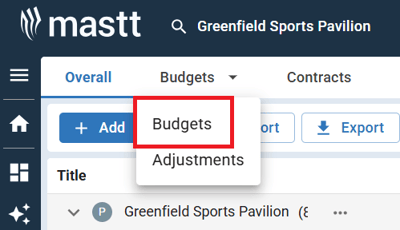
- Click Budgets in the upper tabs.
- Select Budgets from the dropdown menu to access the budget register.
Edit a budget or sub budget
- Locate the budget you want to modify in the budget register.
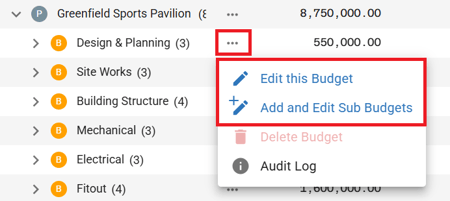
- Click the three dots next to the budget you want to edit.
- Select Edit This Budget or Edit This Sub Budget from the menu. The Budget or Sub Budget form opens with the current details populated.
- Make your changes to any of these: budget name, original amount, status (Draft, Approved, or Closed), budget tags, or notes.
- Click Save to confirm your changes.
Budget statuses
A budget's status controls what you can do with it:
| Status | What it means |
|---|---|
| Draft | Not functional until approved |
| Approved | Fully functional for contract creation |
| Closed | No functionality available, except that closed contracts can be assigned to a closed budget |
Delete a budget or sub budget
- In the budget register, locate the budget or sub budget you want to remove.
- Click the three dots next to the budget.
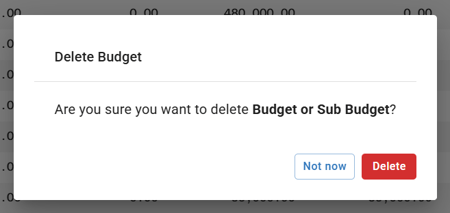
- Select Delete Budget from the menu. A confirmation pop-up appears.
- Click Delete to permanently remove the budget.
Troubleshooting and FAQs
Why can't I delete a budget?
A budget can't be deleted if it has sub budgets, contracts, change orders, forecasts, or adjustments attached to it. When this happens, the Delete Budget option is grayed out in the menu. You must first remove or reassign all dependent items before deleting the parent budget.
Need help?
Contact Mastt Support for additional assistance with budget setup and the Cost module.