
The Risk module helps you manage risks, causes, impacts and treatments in line with ISO 31000. It's configurable to your own risk management framework, and it tracks your project's risks across the whole construction lifecycle.
How the module works
Following the ISO 31000 standard, you work in three steps:
- Create a risk.
- Define its causes and impacts.
- Set out the treatments that reduce the risk.
Click + Add Risk (the blue button at the top left) to start. The Causes and Impacts & Treatments tabs let you add the detail.
Read the risk matrix
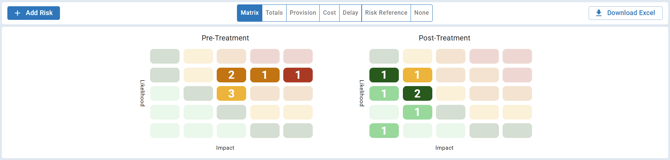
The matrix is a grid that helps you track, assess and respond to risks. Likelihood runs up the side, from Rare to Almost Certain, and Impact runs along the bottom, from Insignificant to Severe. Each risk is plotted by its likelihood and impact ratings, before and after treatment, so you can see how treatment changes your exposure. Colours run from green for low risk to red for high risk.
Analyse your risks in numbers
Use the toolbar to switch views:
| View | What it shows |
|---|---|
| Totals | The number of risks in each category after treatment, so you can see your overall risk landscape and how well treatment is working |
| Provision | The money set aside for each risk category, essentially the budget allocated to cover potential losses or uncertainty |
| Cost | The financial impact of each category |
| Delay | The total days of potential delay for each category |
| Risk Reference | A reference key showing the rating you get for each combination of likelihood and impact, from Very Low to Very High. You can open it even before you've added any risks. |

Click None to hide the charts and matrix when you want to focus on the detailed risk table. Switch back when you want the visual overview.
The risk register
The risk register is the central record of every risk you've identified, including its characteristics and how you're managing it. It improves communication with your team and stakeholders, and it shows who is responsible for what.
Link risks to cost
Turn on Cost Module on a risk to send its cost to the Cost Module. The risk then appears in the Forecast register, where you can edit it, and on the Overall page. See Managing Project Risks in Mastt.
Export your risks
- Export: choose Current View to export what you're looking at, including any filters, or All Data to export everything. It downloads a CSV file.
- Download Excel (top right): downloads the standard Risk Register as a formatted Excel document. It's useful for detailed analysis, for stakeholders who prefer spreadsheets, and for working offline.
Importing changes back into Mastt. To import changes from an exported Excel register, contact your Customer Success Manager or submit a support ticket.
When to use the Risk module
Use it when you need to:
- Identify and document project risks systematically
- Assess risk likelihood and impact
- Track financial provisions and cost impacts
- Monitor potential schedule delays
- Show your risk status to stakeholders visually
- Keep your risk management ISO 31000 compliant
Get started
- Open your project and click Risk in the side navigation bar.
- Review the risk matrix to see your current risk landscape.
- Click + Add Risk (blue button, top left) to begin documenting your risks.
Best practices
- Use the risk matrix when talking to stakeholders. It's far more effective than a table of numbers.
- Update your risk assessments regularly. Risks change as the project does.
- Always fill in causes, impacts and treatments, so each risk is fully understood.
- Keep your provisions in line with your current risk assessments, so your financial cover is adequate.
- Use None to focus on the detailed data when you need to.